Sooner or later anyone working with barcode printers runs into a file with a .TSPL extension (or a printer spool file containing TSPL commands). The first reaction is usually the same: what exactly is inside this file and how can I open it?
The easiest way to open a TSPL file is to use a spool file viewer such as O&K Printer Viewer. It can decode TSPL printer commands, display the label content in a readable form, and export the label as a PDF file.
TSPL File Viewer Tool
If you regularly work with TSPL files, using a dedicated viewer is much easier than trying to read printer commands manually.
O&K Printer Viewer is designed for opening and inspecting printer spool files, including TSPL print jobs.
It allows you to:
- open TSPL files
- decode printer commands
- view label layout and content
- inspect barcode data
- export labels to PDF
Instead of reading raw printer commands line by line, you can immediately see what the printed label actually looks like.
Learn more about O&K Printer Viewer →
TSPL Viewer
A TSPL viewer is a tool that can open and interpret TSPL printer command files and display the label content in a readable form.
Because TSPL files contain printer instructions rather than normal document data, most file viewers cannot display them correctly. A specialized TSPL viewer decodes the commands and reconstructs the printed label layout.
O&K Printer Viewer works as a TSPL viewer and allows you to open printer spool files, inspect label data, and export labels as PDF documents.
| Feature | Supported |
|---|---|
| Open TSPL files | ✔ |
| Decode TSPL commands | ✔ |
| Display label layout | ✔ |
| View barcode data | ✔ |
| Export labels to PDF | ✔ |
What is a TSPL file?
TSPL stands for TSC Printer Language. It is commonly used by barcode and label printers to describe how a label should be printed.
A TSPL file typically contains commands that define:
- label size
- print direction
- text fields
- barcodes
- QR codes
- graphics
- number of labels to print
Instead of describing a document like PDF, TSPL tells the printer exactly where each element should appear on the label.
What a TSPL file looks like
If you open a TSPL file in a text editor, you will often see something like this:
SIZE 60 mm,40 mm
GAP 2 mm,0 mm
DIRECTION 1
CLS
TEXT 40,40,"3",0,1,1,"Product A"
BARCODE 40,90,"128",80,1,0,2,2,"123456789"
PRINT 1
For the printer this is perfectly clear. For a human it is not very convenient because the label layout must be imagined from coordinates and commands.
Opening TSPL files in a text editor
You can open TSPL files using a normal text editor such as:
- Notepad
- Notepad++
- VS Code
This approach is useful if you only want to:
- confirm the file contains TSPL commands
- search for text values
- check barcode data
- verify print quantities
However, reading raw TSPL commands is not always convenient when the label contains many elements.
A better way to view TSPL labels
If you want to actually see the label layout, it is easier to open the file using a spool file viewer that understands printer languages.
O&K Printer Viewer can open TSPL print files and decode the commands into a readable form.
Instead of looking at raw printer instructions, you see the label content rendered visually.
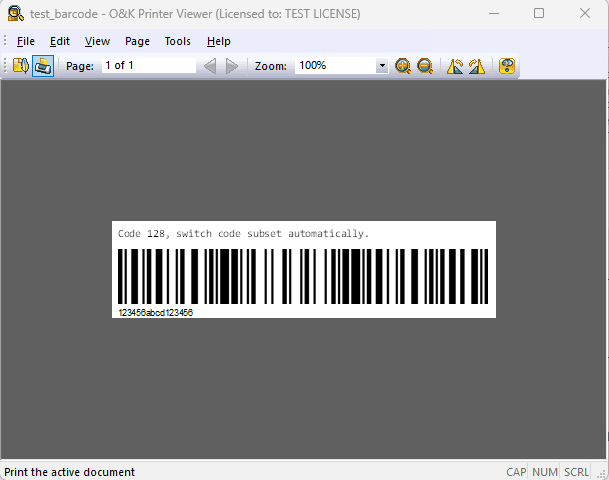
Decoded TSPL label displayed in O&K Printer Viewer
Saving TSPL labels as PDF
A particularly useful feature is the ability to export the decoded label as a PDF.
This can help when you need to:
- send the label to support teams
- share label output with colleagues
- archive label results
- compare output from different software versions
Instead of sending someone a raw TSPL file, you can simply send a PDF preview of the printed label.
When you might need to open TSPL files
TSPL files appear in many real-world environments:
- warehouse management systems
- shipping and logistics platforms
- ERP integrations
- POS systems
- barcode labeling software
When a label prints incorrectly, inspecting the original TSPL data can quickly reveal whether the issue comes from the software generating the label, the printer driver, or the printer itself.
TSPL vs Other Barcode Printer Languages
TSPL is one of several printer languages used by barcode printers.
- ZPL — used by Zebra printers
- EPL — older Zebra language
- DPL — used by Datamax printers
- CPCL — common in mobile printers
Each printer language uses its own command syntax, which means spool files created for one printer type cannot always be interpreted by another.
Conclusion
TSPL files are printer command streams used by barcode and label printers rather than normal documents.
While you can inspect them using a text editor, a specialized viewer makes it much easier to understand the actual label content.
O&K Printer Viewer allows you to open TSPL files, decode label commands, view the label visually, and export it as a PDF.
For developers, IT administrators, warehouse engineers, and support teams working with label printers, this can significantly simplify troubleshooting and print analysis.