Office printing is often treated as a routine background process. Documents are sent to printers, pages come out, cartridges are replaced, and the cost is absorbed into general operating expenses. Yet in many organizations, printing is far more expensive than it appears on paper.
When dozens or hundreds of employees print every day, even small inefficiencies become expensive over time. Unnecessary color printing, repeated print jobs, oversized documents, wasteful printer settings and poorly distributed workloads can quietly increase spending month after month.
This is why more organizations are turning to printer monitoring software. By tracking print jobs, analyzing printer usage and maintaining visibility into office printing activity, companies can find waste, improve accountability and reduce printing costs without interrupting normal work.
In this article: you will learn how printer monitoring software helps reduce printing expenses, what data should be tracked, where waste typically occurs and how a centralized print monitoring solution such as O&K Print Watch can help control office printing more effectively.
Contents
- The hidden cost of office printing
- Why printing costs are hard to control
- Why cartridge yield figures can be misleading
- What printer monitoring software should track
- Where printing waste usually comes from
- How print job analysis helps reduce costs
- Using reports to optimize printer usage
- Why document preview matters
- Centralized print monitoring across the organization
- How printer monitoring delivers ROI
- Using O&K Print Watch to control printing expenses
- Frequently asked questions
The Hidden Cost of Office Printing
The price of a printer rarely reflects the real long-term cost of printing. In many environments, the printer itself is one of the least expensive parts of the printing ecosystem. The larger costs are usually hidden in recurring supplies, maintenance and inefficient usage patterns.
A company may believe it spends a reasonable amount on printing because each individual print job appears small. But once those jobs are multiplied by hundreds of users, multiple departments and long periods of time, the numbers can become surprisingly large.
The total cost of office printing may include:
- toner and ink cartridges
- paper consumption
- maintenance and service
- replacement parts
- printer downtime
- electricity and device wear
- administrative time spent investigating printing issues
Without real data, these costs are difficult to allocate and even harder to reduce. This is the point where print monitoring becomes valuable: it turns invisible activity into measurable information.
Why Printing Costs Are Hard to Control
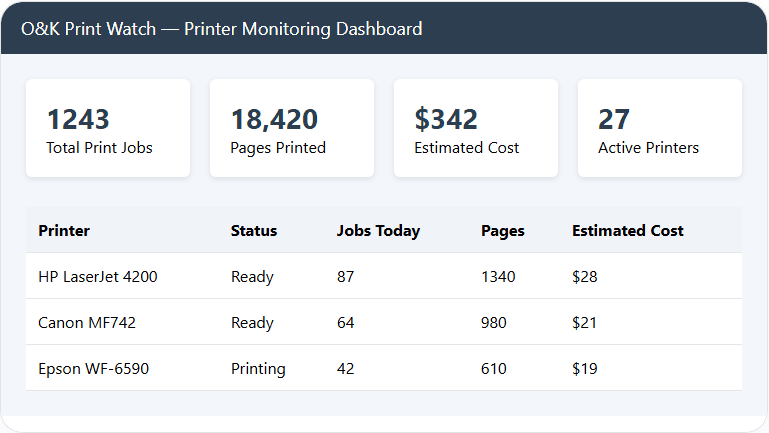
Most organizations do not lack printers. They lack visibility. Employees print from desktops, laptops, terminal sessions or line-of-business systems, and after the job is completed there is often no convenient way to understand what happened.
Administrators and managers commonly ask questions such as:
- Who prints the most pages each month?
- Which printer generates the highest consumables cost?
- How often are users printing in color when grayscale would be enough?
- Which departments print unusually large documents?
- Are the same documents being printed again and again?
- Which print jobs are responsible for abnormal spikes in usage?
If the organization relies only on basic printer logs or standard operating system tools, these questions are difficult to answer. Native logs are often fragmented, hard to search and not designed for management analysis. They may show that printing happened, but not provide the kind of clear reporting needed for cost control.
That is why businesses that want to reduce printing expenses typically need a dedicated print tracking or printer usage monitoring solution rather than simple spooler records.
Why Cartridge Yield Figures Can Be Misleading
One of the biggest misconceptions in office printing comes from cartridge yield numbers. A toner or ink cartridge may be advertised as suitable for a certain number of pages, but those estimates are based on standardized test pages rather than on the documents real organizations actually print.
In practice, many office documents consume far more toner or ink than a standardized sample page. Presentations, web pages, brochures, forms with graphics, CAD drawings, invoices with logos and color reports all behave differently from theoretical test output.
Real-world printing is affected by:
- coverage percentage on the page
- use of graphics and photographs
- color versus monochrome printing
- duplex or simplex settings
- paper size
- draft versus high-quality modes
This is why organizations often feel that cartridges “run out too quickly.” The problem is not always the cartridge itself. Very often, it is the difference between expected usage and actual document behavior. A good printer monitoring system helps bridge that gap by showing how printers are truly being used.
What Printer Monitoring Software Should Track
To control printing costs, organizations need detailed and searchable data. Good printer monitoring software should not only record that a print job happened; it should also preserve enough context to make the data useful for analysis and decision-making.
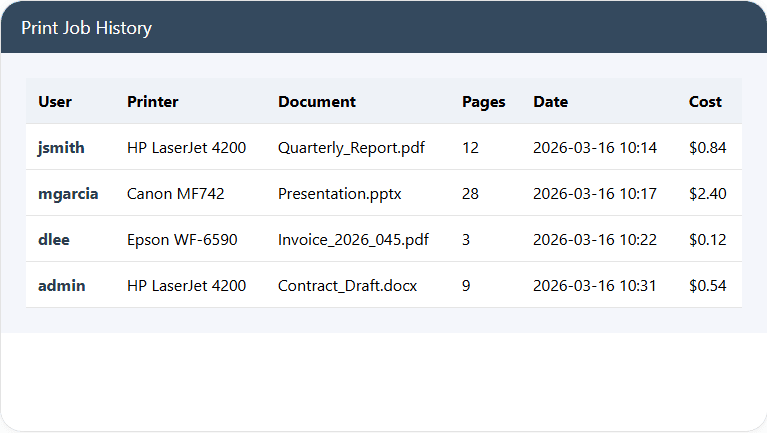
Important print job information usually includes:
- user name
- computer or workstation name
- printer name
- document title
- date and time of printing
- number of pages printed
- paper format
- duplex mode
- printer settings
- estimated print job cost
This kind of visibility makes it possible to build a complete picture of printer activity tracking across the organization. Instead of assumptions, administrators can work with numbers.
For companies that want even deeper control, it is also useful when the software can maintain a long-term print job history and generate reports by user, printer, department or time period.
Where Printing Waste Usually Comes From
Many organizations try to reduce printing expenses by replacing cartridges less often, negotiating better supplier contracts or buying different printers. These steps can help, but they do not solve the core issue if wasteful printing behavior remains invisible.
In practice, a large share of excess cost comes from ordinary habits that nobody notices because no one is measuring them.
1. Unnecessary color printing
Color output is often significantly more expensive than black-and-white printing. Yet many documents are printed in color simply because the default setting was never changed.
2. Repeated printing of the same document
Users may reprint a file because they forgot where they left it, want another copy, or assume the first print failed. Across many employees, repeated printing can become a major hidden cost.
3. Printing email and web content
Web pages and emails often contain logos, banners, images and formatting elements that consume more toner than expected while adding little value on paper.
4. Large presentations and graphics-heavy reports
Slides, charts and image-rich documents may use far more consumables than standard office text documents.
5. Poor printer distribution
Some printers may be overloaded while others are underused. This can increase wear, maintenance frequency and supply turnover on the busiest devices.
6. Lack of accountability
If nobody can see who prints what, there is little incentive to think carefully about necessity, settings or volume.
How Print Job Analysis Helps Reduce Costs
Once detailed print data is available, organizations can begin moving from passive observation to active optimization. This is where print job tracking becomes a cost-reduction tool rather than just an audit record.
By analyzing print jobs, administrators can identify patterns such as:
- users who print unusually large numbers of pages
- departments with high color output
- printers that generate higher-than-average consumables costs
- jobs that repeatedly use inefficient settings
- days and times when print volume spikes
With that information, the organization can take practical actions. For example:
- change default settings to duplex printing
- encourage grayscale output for internal documents
- route high-volume jobs to more economical printers
- review whether certain document types should be printed at all
- set print policies or quotas for selected groups
This is far more effective than trying to reduce costs blindly. Instead of guessing where waste exists, the company can focus on the exact behaviors and devices responsible for unnecessary expense.
Using Reports to Optimize Printer Usage
Raw print data is useful, but reports are what turn it into management insight. A strong printer monitoring system should provide clear reporting that helps both technical administrators and business managers understand how printing resources are being used.
Useful reports may include:
- pages printed by user
- pages printed by department
- printer usage by device
- estimated cost by user or printer
- color versus monochrome printing
- high-volume print job summaries
- historical trends over time
These reports help answer strategic questions, not just technical ones. Management can see whether costs are rising, where savings opportunities exist and whether changes in printing policy are actually working.
If a department suddenly begins printing much more than usual, reporting can reveal the change early. If one printer consumes far more resources than expected, the organization can investigate whether the device is being used for the wrong kinds of jobs or whether its settings need review.
This makes printer usage monitoring useful not only for control, but also for planning and budgeting.
Why Document Preview Matters
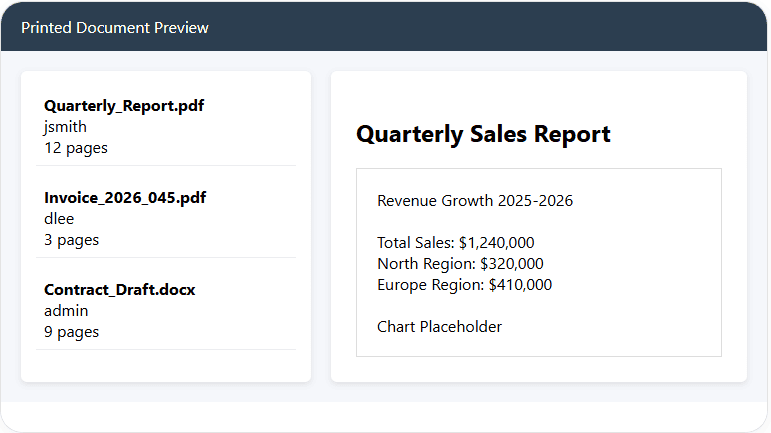
One especially valuable feature in advanced print monitoring systems is the ability to preview or archive printed documents. This goes beyond basic logging and provides additional insight into the real content of print jobs.
Document preview can help organizations:
- verify what was actually printed
- detect misleading or vague document titles
- investigate high-cost jobs
- review printing incidents
- maintain better control over sensitive output
From a cost perspective, preview is useful because it allows administrators to see which types of content are driving expensive print behavior. A document title alone may say “Report” while the actual file contains dozens of color-heavy pages or image-rich slides.
For organizations where visibility and accountability matter, this feature can be as important as the print log itself.
Centralized Print Monitoring Across the Organization
As organizations grow, print environments become harder to manage manually. Multiple departments, branch offices, shared printers, dedicated devices and mixed printing workloads all make the infrastructure more complex.
A centralized print monitoring solution gives administrators a single point of visibility. Instead of checking separate printers one by one, they can review printing activity across the network from one interface.
Centralized monitoring helps with:
- consolidated print job logs
- cross-printer analysis
- comparisons between departments and locations
- easier incident investigation
- faster identification of expensive usage patterns
This is particularly important in companies with many printers or with users who print from multiple systems. Centralization reduces administrative overhead while improving decision quality.
If your environment includes Linux-based printing as well, it is also worth reviewing O&K Print Watch Linux for print accounting and control in CUPS-based infrastructure.
How Printer Monitoring Delivers ROI
Printer monitoring software is often evaluated as a control tool, but it should also be viewed as an investment. The return on investment usually comes not from one dramatic change, but from many small improvements that compound over time.
ROI may come from:
- reduced color printing
- less duplicate printing
- better use of economical printers
- more efficient default settings
- reduced waste from unnecessary documents
- faster identification of problem users or departments
- improved planning for supplies and maintenance
Even modest reductions in monthly print volume can create meaningful annual savings, especially in organizations with many users or high-volume printing workflows.
Just as importantly, monitoring creates a culture of awareness. When printing is no longer invisible, users become more intentional. That alone often reduces avoidable output.
Using O&K Print Watch to Control Printing Expenses
O&K Print Watch is designed to help organizations monitor printing activity, maintain detailed print history and analyze how printers are used across the network.
With O&K Print Watch, administrators can:
- track all print jobs in one place
- analyze printer activity by user, printer and department
- review print job history
- estimate printing costs
- investigate wasteful printing patterns
- preview printed documents
- generate reports for management and optimization
This combination of visibility, reporting and centralized control makes it easier to reduce unnecessary printing and manage office printing expenses more effectively.
To learn more, you may also find these pages useful:
- Print Monitoring
- Print History on Printers and MFPs
- Consumables Accounting
- View Printed Documents
- Download O&K Print Watch
Want to see where printing costs come from in your organization?
Use O&K Print Watch to track print jobs, analyze printing behavior, maintain print history and identify the sources of unnecessary printing.
Download the free trial and see how printer monitoring can help reduce printing costs in a real office environment.
Conclusion
Reducing printing costs is difficult when the organization cannot clearly see what is being printed, by whom, on which printer and at what cost. In many offices, that lack of visibility is the real reason expenses remain high.
Printer monitoring software solves this problem by making print activity measurable. It helps organizations identify waste, optimize printer usage, review historical print behavior and make better decisions about settings, supplies and workflows.
For companies that want to control office printing without guesswork, print monitoring, print tracking and printer usage analysis are no longer optional extras. They are practical tools for lowering recurring costs and improving visibility across the entire printing environment.
Frequently Asked Questions
How can printer monitoring reduce printing costs?
Printer monitoring reduces costs by showing who prints, what is printed, how many pages are printed and which printers are used. This helps organizations identify waste, reduce unnecessary color output, improve default settings and optimize printer usage.
What is printer monitoring software?
Printer monitoring software tracks print jobs across a network and records details such as user name, printer, pages, date, document title and other job properties. Many solutions also provide reports and print history analysis.
What causes high office printing costs?
High printing costs are often caused by excessive color printing, repeated print jobs, image-heavy documents, poor default settings, lack of visibility into user behavior and inefficient use of available printers.
Can printer monitoring show who prints the most?
Yes. A good print monitoring system can show which users, departments or devices generate the highest print volume and the highest estimated printing cost.
Why is print job history important?
Print job history allows administrators to analyze past printing activity, investigate unusual usage, compare departments, identify high-volume users and make more informed decisions about printer policies and cost control.